Printable Blank Notary Form: Perfect for Your Next Notarization
If you’re looking to become a California notary, our state-approved online course covers everything including exam prep and your certificate. Learn about the course
If you need to notarize a document that does not already have a notarial certificate attached, you need a loose certificate form. This guide explains where to get free California notary forms, how to fill them out, and when to use each type.
California requires notaries to use state-prescribed certificate wording for acknowledgments (Civil Code 1189) and jurats (Government Code 8202). The Secretary of State provides these forms as free PDF downloads.
Notary Forms Explained
“Notary forms” are used by notaries public to verify the identity of people who come before them to sign documents. The form contains information about the person being notarized and space for the notary to sign and stamp their seal. The official term is the “notarial certificate.”
The notarial certificate is the part of the notarization that contains information about the document, the signer, and the notary. It must be completed correctly for the notarization to be valid.
California notaries can find instructions for completing the notary certificate on the Secretary of State’s website.
Why Notary Forms Matter
Most notarizations require notarial certificates, and California has specific laws for what must appear on them. If the document does not include a notarial certificate, or if the certificate was written for another state, you must attach a separate form that meets California requirements.
Using an out-of-state form is one of the most common reasons notarizations get rejected by county recorders and title companies. Always carry California-compliant forms. For help choosing the right one, see our guide to choosing the right notarial certificate.
How to Complete a Notary Form
Completing a notary form requires attention to detail. The notary’s signature and seal are what make the notarization official. The signature must be original and the seal must be affixed by the notary in such a way that it is photographically reproducible.
The steps specific to California:
- Verify the signer’s identity using a government-issued photo ID (driver’s license, passport, or ID card). If the signer lacks satisfactory evidence of identity, you can use credible witnesses.
- Fill in the venue (state and county), date, and signer’s name on the certificate.
- For a jurat, administer the oath or affirmation before the signer signs in your presence.
- Sign the certificate exactly as your name appears on your commission.
- Affix your official seal next to your signature.
- Record the notarization in your notary journal.
Sample Notary Form
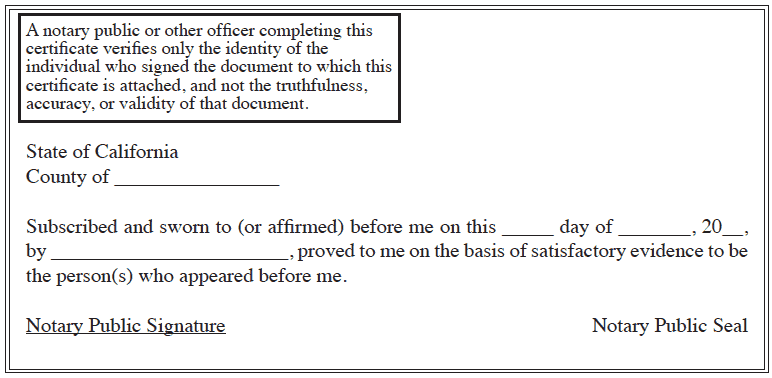
This is a sample of a notary form for a California acknowledgment. The form includes the notary’s information, the type of notarization, the signer’s information, and space for the notary to sign and stamp.
The Official California Acknowledgment Wording
Civil Code 1189 prescribes the acknowledgment certificate; you cannot substitute your own wording. This is the all-purpose acknowledgment form exactly as the Secretary of State publishes it, drawn from the state’s own PDF:
State of California
County of _____________________________

On _____ ______________ ____ before me, ________________________________,
(insert name and title of the officer)

personally appeared ______________________________________________________,
who proved to me on the basis of satisfactory evidence to be the person(s)
whose name(s) is/are subscribed to the within instrument and acknowledged to
me that he/she/they executed the same in his/her/their authorized capacity(ies),
and that by his/her/their signature(s) on the instrument the person(s), or the
entity upon behalf of which the person(s) acted, executed the instrument.

I certify under PENALTY OF PERJURY under the laws of the State of California
that the foregoing paragraph is true and correct.

WITNESS my hand and official seal.

Signature ______________________________ (Seal)
The Secretary of State publishes the current forms as free PDFs: acknowledgment form and jurat form. Download them there rather than from a third-party site, so you always have the version the state currently accepts. A notary completing this certificate verifies the identity of the signer, not the truthfulness or validity of the document itself.
Where to Find Printable Notary Forms
The best place to find notary public forms is your state’s Secretary of State website. The forms are usually available as free PDF downloads.
For California notaries, here are the direct links:
- Acknowledgment: Download the CA acknowledgment form
- Jurat: Download the CA jurat form
Some companies sell forms, but this just increases the cost to become a notary public. Download them free from the state.
Acknowledgments vs. Jurats
Acknowledgment: The notary confirms the signer’s identity and that they signed willingly. The notary does not need to witness the signing, but must check the signer’s ID.
Jurat: The notary watches the signer sign the document and administers an oath or affirmation. The signer must sign in the notary’s presence.
For a full comparison, see our guide on acknowledgment vs. jurat in California.
Creating Your Own Forms
You could create your own forms using a word processor, but it is not recommended. Downloading from the state is easier and guarantees the language meets requirements. A mistake on a homemade form could invalidate the notarization.
Other Options
You can also buy notary forms from office supply stores or specialty notary supply companies. Two common options:
- Preprinted paper forms: Similar to what you download from the state, but already printed.
- Form stamps: Rubber stamps that imprint the notary certificate directly onto the document. Popular with signing agents because they do not add extra pages, which saves recording fees and reduces the risk of fraud.
The maximum notary fee you can charge is the same whether you use a free downloaded form or an expensive one from a supplier. There is no reason to pay for forms when the state provides them free.
What Must Appear on Every California Notary Form
- Venue: State of California, County of [your county].
- Date: The date you performed the notarization.
- Signer name: Exactly as shown on their ID.
- Notary signature: Matching the name on your commission.
- Notary seal: Clear and legible, with your name, commission number, county, and expiration date.
Missing any of these elements can cause the document to be rejected. For seal details, see our guide to the California notary seal.
Frequently Asked Questions
Where can I download free California notary forms?
From the California Secretary of State’s website. Acknowledgment form and jurat form are both free PDFs.
What is the difference between an acknowledgment and a jurat?
An acknowledgment verifies identity and willingness to sign. A jurat requires the signer to sign in the notary’s presence and take an oath or affirmation.
Can I create my own notary form?
Technically yes, but it is not recommended. Use state-approved forms to avoid mistakes that could invalidate the notarization.
Do I need to use a different form for each notarization type?
Yes. Acknowledgments and jurats require different certificate language. Make sure you use the correct form for the act being performed.
Are notary form stamps worth buying?
For active notaries and signing agents, yes. They save time, avoid adding extra pages to documents, and reduce recording costs for clients.
What does a notarized document look like?
It shows the signer’s signature together with the notary’s completed certificate: the venue, the notary act wording, the date, the notary’s signature, and the official stamp or seal. The sample acknowledgment form below shows what each part looks like.
Ready to Become a Notary?
Our state-approved online course covers everything you need. Complete the training, pass the exam, get your commission.